
custom erp and crm
A custom ERP or CRM, built around how your team works.
Quotes in Excel, orders in the inbox, invoices in another program and the stock in one colleague's head. A custom ERP or CRM puts all of it in one system, with the screens and fields your team needs. As your business grows we add modules, and AI reads incoming orders and invoices into the system for you. We deliver in phases at a fixed price. The first version is usually ready within two months.
Package or custom?
Often an existing package is the right choice, and then we say so. This is how we weigh it.
Take a package if
- your way of working is standard: quote, order, delivery and invoice, no exceptions
- you work with two or three users and the licence does not hurt
- you need to start fast and the package can run tomorrow
- a good connection to your accounting and your webshop already exists
Go custom if
- your team has worked around the package for years, with Excel and e-mails on the side
- your licences per user or per module keep adding up
- you do something no package knows: your own price calculation or a planning with rules only you know
- you glue four programs together and something falls through every week
Not sure? In the first conversation we tell you which way to go, even when that is a package.
extensible and adaptable
A system that grows with your business
A package decides how you work. With custom software you decide what every screen looks like, and what you don't need today, we add later.
Extend it later
You start with the part that costs the most time now. Planning, a customer portal, a webshop connection or reports for your accountant come when you're ready, as modules on the same system. Your data doesn't have to move anywhere for it.
- planning
- customer portal
- webshop connection
- reports
Fully adaptable
Every screen and every field follows the way you work, and so do the steps an order goes through. If an order needs an extra approval or your own price calculation, it's in there. When the way you work changes, we adapt the system with it.
- your own fields
- your own statuses
- your price calculation
- permissions per role
ai automation
AI does the retyping in your ERP or CRM
Whatever arrives by e-mail or as a PDF is already in your system before anyone has to retype it. Where the computer is unsure, it sets the item aside. Anything that goes to a customer, you see first.
More about AI automationReading e-mails and orders
An order sent by e-mail becomes an order in the system, with the customer and the items already filled in.
Reading invoices
Purchase invoices and delivery notes are read and prepared for your accounting. You only check them.
Preparing quotes
From the request and your own prices, a draft quote is ready. You adjust it and send it.
Customer history in brief
Before you call a customer, a few lines tell you what happened and what is still open.
Stock and overdue invoices
The system tells you when an item drops below its minimum or an invoice stays unpaid too long.
What it can hold
Customers and quotes
Every customer, contact and quote in one place. A quote becomes an order with one click, and you see who needs a follow-up and when.
Orders and stock
Orders come in from your webshop, your inbox or the counter. Stock updates with every sale and you know what to reorder before it runs out.
Invoices and accounting
Invoices leave the system and land in your accounting package without anyone retyping them. Payments come back into the system and you see who is still outstanding.
Planning and team
Who does which job, with what material and when. On the phone for whoever is on the road, with photos and a signature at delivery.
How hexel builds it
You know up front what each phase costs and when it is ready. We would rather show working screens than slides.
01 · week 1
Observe
We follow an order through your business for a few hours: who retypes which data where, and where it gets stuck. Then you get a proposal with phases, a fixed price per phase and a date.
02 · phase 1
First working version
We start with the part that pays off most, usually orders or quotes. Your team uses it in the browser, on phone and on laptop, and we adjust what they flag while it is still cheap.
03 · next phases
Connect and extend
Accounting, till, webshop or the package you keep: every phase adds a piece. After each phase you decide whether to continue.
04 · after that
Keep it running
Hosting, backups and updates stay with us. For software that keeps your business running, we agree up front how fast we respond.
integrations
Works with what you already have
You don't replace an ERP or CRM on a whim. We build next to it and on top of it: your software talks to the package through its API, the data stays in one place and nobody retypes anything. Your package not listed? If it has an API or an export, we connect it.
- Odoo
- Salesforce
- HubSpot
- Microsoft Dynamics 365
- SAP Business One
- Exact Online
- Teamleader
- Zoho
- Pipedrive
- Yuki
- Octopus
- Billit
- Lightspeed
- Shopify
- WooCommerce
- Microsoft 365
- Google Workspace
custom too: your own ERP or CRM when no package fits
From the field
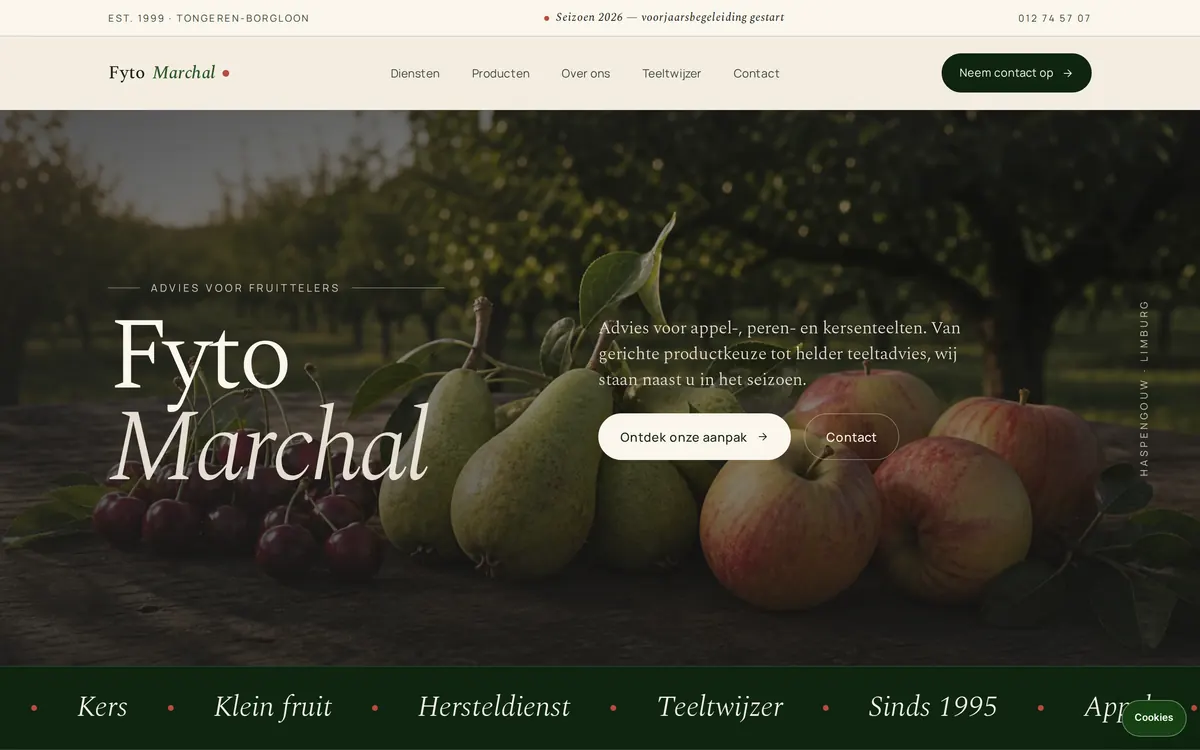
website × automation — fytomarchal.be
Fyto Marchal × hexel
The old paper workflow is fully digitised and now lives in the system, with automations taking over the manual work. Behind the scenes that means time saved and a clear overview. Out front, customers get a proper site with a newsletter.
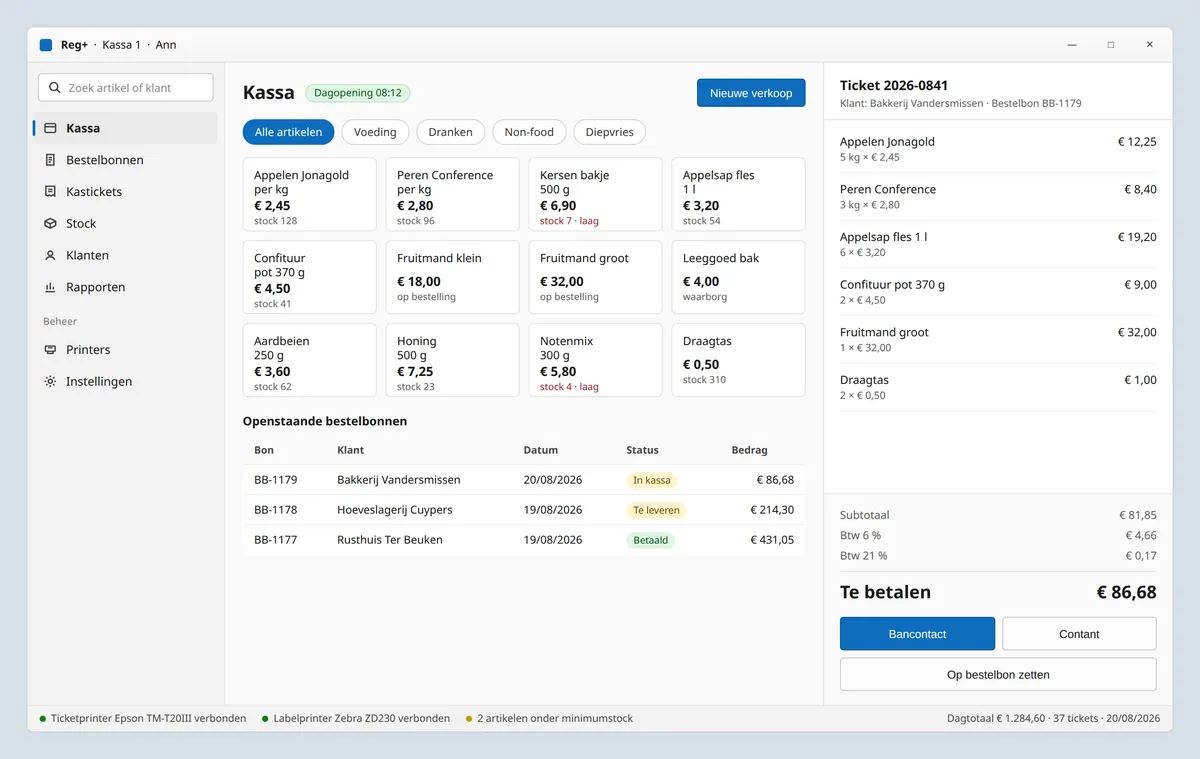
desktop software — Windows
Reg+ × hexel
Order forms, till receipts and end-of-day closing in one program, with stock that comes off the shelf with every sale. Receipt and label printers hang off it directly, so the counter keeps moving without a detour through paper.
Questions we often get
What is the difference between an ERP and a CRM?
A CRM follows your customers: contacts, quotes, appointments and follow-up. An ERP follows what happens next: orders, stock, planning and invoices. For an SME that often sits in one system, and when it is custom you do not have to draw that line.
What does a custom ERP or CRM cost?
We work in phases with a fixed price per phase. You know up front what each phase costs and you can stop after any of them. You get a priced proposal within two working days after the first conversation.
How long does it take?
The first working version is usually ready within two months. After that, each phase adds a piece, at the pace your team can handle.
Does it connect to my accounting and my till?
Usually, yes. If there is an API or an export, we connect it. We check per program what the connection can handle and tell you up front if something will not work.
What happens to the data in my current programs?
We bring it along. Customers, products, prices and open orders are imported from your export. The old programs keep running until the new version has proven it works.
Who owns the software afterwards?
Your data is yours and you can always export it. On the software you get a usage right without an end date once it is paid, even when hosting or maintenance moves elsewhere later. The details are in the terms.
the rest of your IT
And who looks after your team's computers?
hexel is the digital arm of Reboot-IT, run by the same people. We build your ERP or CRM as hexel. For day-to-day management of your computers and network, go to Reboot-IT. That is also where we give AI training and advice, starting with a free intake. If you want ChatGPT Business or Microsoft 365 Copilot for your whole team, we set it up there and manage it. Claude is an option too. The Reboot-IT site is in Dutch.
Which step costs you the most time right now?
Tell us briefly how an order moves through your business today and where it gets stuck. Within two working days you get a proposal with phases, a price and a date, or honest advice to stay with your package.