
04 · ai and automation
AI for the routine work in your business.
We connect AI to your mailbox and your accounting. Requests land in your system on their own, and invoices in your books. Anything that goes out, you read first.
Book a conversationWhat we build
01 / 04
Enquiries and follow-up
A request by email lands in your system with the customer details attached, and a reply is ready to review. You decide who follows it up.
02 / 04
Invoices and documents
Invoices and purchase orders are read and passed on to your accounting or your ERP. If the computer is unsure about an amount or a VAT number, it sets the invoice aside for someone on your team.
03 / 04
Assistants
An assistant that answers from your own price lists and files, with the source attached. Your team uses it internally, or you put it on your site as a chat.
04 / 04
Copy and translations
Product copy and translations for hundreds of items at once. The computer writes a first version, someone on your team reviews it before it goes live.
A virtual receptionist for your phone? See the AI receptionist.
models and tools
What it runs on
- Claude
- ChatGPT
- Gemini
- DeepSeek
- n8n
- Make
- Zapier
- OCR
- speech to text
- image generation
For most tasks a small, inexpensive model is enough. We only use a heavier model where the work calls for it. If your data cannot leave the building, an open model runs on your own server.
example from practice
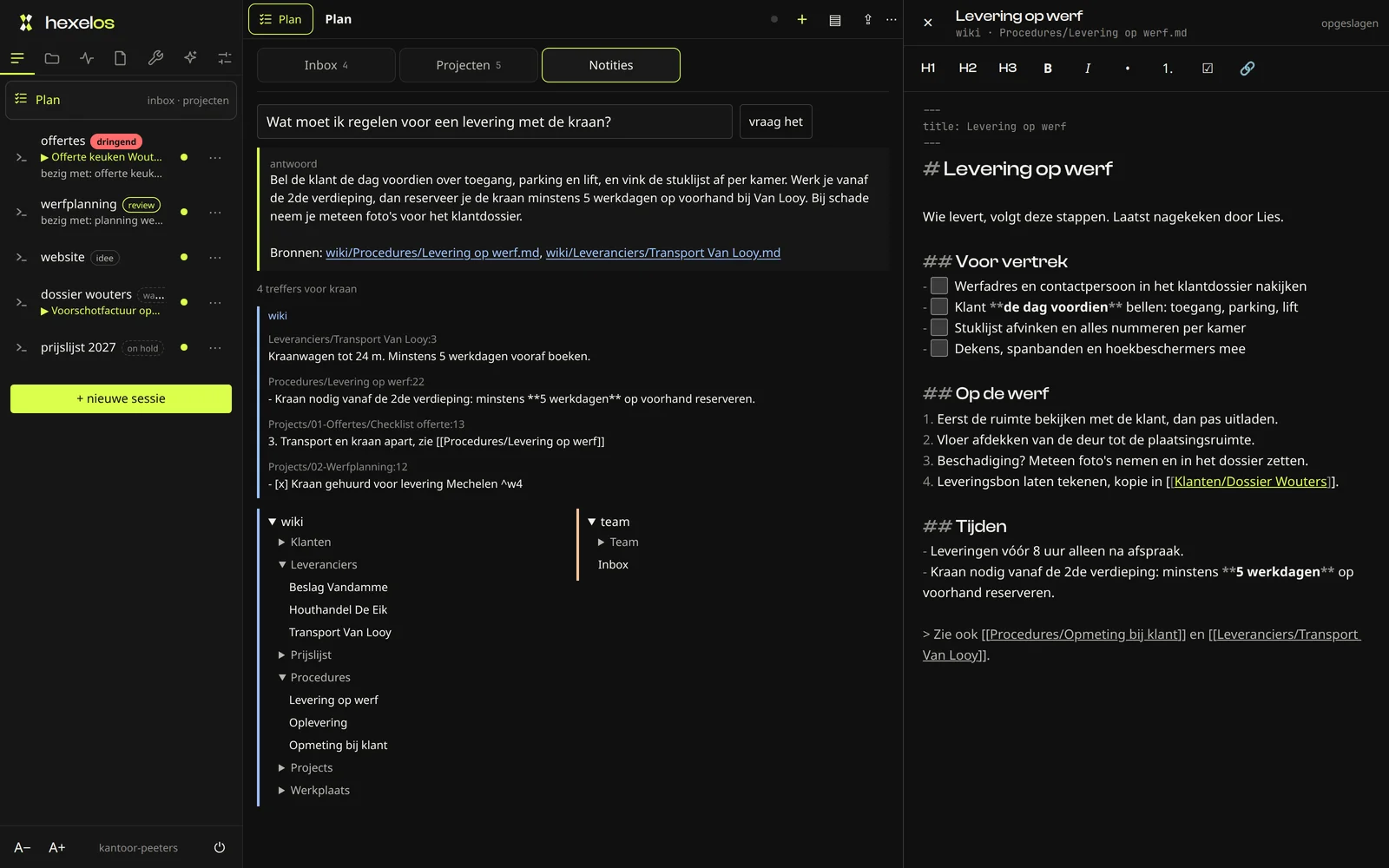
hexelos is our own company brain: notes, procedures, projects and running tasks in one place. You ask it a question and get the answer with its source. For your business we set up a workspace like this that your whole team uses, each with their own login.
more about a company brain14hours a week of recurring work
example- Retyping invoices3 h
- Drafting quotes3 h
- Calling customers backstays with you3 h
- Forwarding orders2 h
- Questions about delivery times2 h
- Appointment reminders1 h
Where does AI save you time?
We sit down together for a few hours and go through your week. You leave with a list of tasks a computer can take over, each with a price and what it saves you.
Book the workshopWant your team to work with AI?
Advice, setting up ChatGPT, Copilot or Claude, onboarding and training for your team all run through Reboot-IT, our IT arm. The Reboot-IT site is in Dutch.
What else can go in
Documents and admin
- read invoices
- The amount and due date go from the pdf straight into your bookkeeping.
- process order forms
- An order form by mail or on paper becomes an order in your system.
- prepare quotes
- From the enquiry and your price list comes a first quote that you check.
- assistant on your own documents
- Ask about a procedure or a file and get the answer with the page it came from.
Customer contact
- sort enquiries
- Mails and forms reach the right person, sorted by type.
- draft replies
- Every mail comes with a reply ready for you to adjust and send.
- chat on your site
- Visitors get an answer from your own information, in the evening too.
- phone and voice assistant
- Picks up when you can't and puts the question in your calendar with a time to call back.
Content and images
- product copy at volume
- Hundreds of items get a first text in the tone of your brand.
- translations
- Your webshop or manual in another language, with the same technical terms throughout.
- summaries and reports
- A long report or a month of tickets on one page you can read quickly.
- product photo clean-up
- A white background and the same crop across your whole catalogue.
Connections and checks
- ERP or CRM connection
- What the machine reads ends up in the software you already use.
- check before sending
- Nothing goes to a customer until someone on your team approves it.
- log of every action
- Afterwards you see for each step when it happened and which source it used.
- processing agreement
- In black and white what may happen to your data and where it is stored.
we start with the work that costs the most time, the rest can follow later
Questions we often get
Isn't AI too expensive for an SME?
You start with one task and one connection. For a lot of work a small, inexpensive model is enough. Before we start, you know what it costs and how many hours a week it saves.
What happens to my data?
We agree what may go to a model and what may not, with a data processing agreement to match. If your data can't leave the building, an open model runs on your own server.
Doesn't AI make mistakes?
Yes, which is why we build in checks. When the computer is unsure, it sets the work aside. Anything going to a customer is approved by someone on your team first.
Does it work with my current programs?
That is the starting point. We connect to the ERP or accounting software you already have.
Where do we start?
With the work that comes back every week and costs the most time. In the workshop we walk through your week and pick the first task together.
Does this replace my people?
It takes over the retyping. Decisions stay with your team.
What costs you the most time every week?
Tell us which work keeps coming back and how often. Within 1 working day you get a proposal with a price and a start date. If it is not worth it, we say so.
Book a conversation